October 9 update: movement in first and third person now lets you choose a primary and an alternate key for each direction through the main menu. All eight bindings can be changed or cleared, and are saved. Commit a4a87d20e was installed in the same Iniciar-Tristram.cmd launcher at 01:35, Brasília time. Interactive review with physical devices remains pending.
In the October 8 update, Tristram's first-person view combined mouse look, WASD or arrow-key movement and the wheel to move from third person into first person — or back. Camera protection accounted for the assembled architecture while retaining Diablo's movement rules; the technical sample described below does not cover every structure or position. The update in commit 3863e4436 was installed through the same Iniciar-Tristram.cmd launcher on October 8, 2026, at 19:31, Brasília time.
The initial mouse and arrow-key controls arrived at 17:30 that day, in commit a227d4afc. The later eye-height calibration remains documented below.
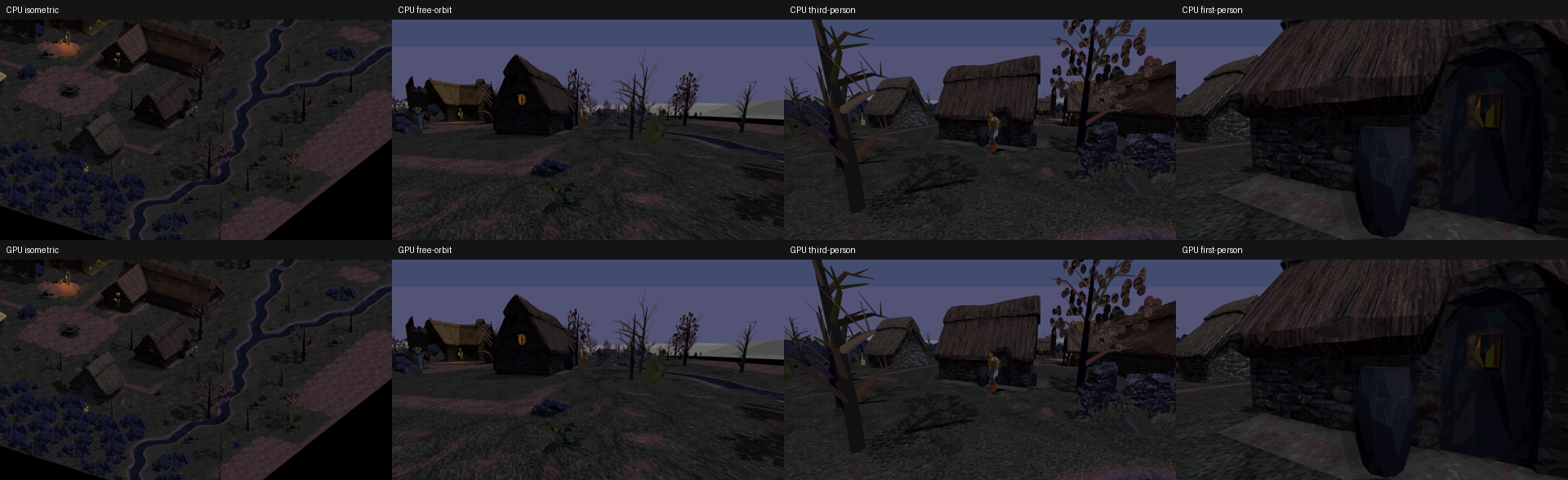
The camera comparison above was published earlier and serves only as context. This post contains no new gameplay, crosshair or keymapping-menu captures. The implementation and test limits are described in the documentation for the current revision.
Choosing movement keys
In the main menu → Settings → Keymapping, there are four movement directions, each with a primary and an alternate binding. The defaults remain W/S/A/D and ↑/↓/←/→. Each binding can be changed or removed; Restore movement defaults resets only this group.
The same preferences apply to first and third person. Movement remains relative to the camera and uses the native eight directions, cadence and collision. The primary and alternate keys are independent: holding W and ↑, then releasing only one, keeps forward movement active.
This context preserves the game's common shortcuts: S can remain bound to spells outside camera-relative movement. Keys reserved for the camera, pause and screenshots are protected; a conflict between movement bindings is rejected with identification of the existing binding. If a default is unavailable, the reset reports it without taking the reserved key.
Changes, including an explicitly empty alternate binding, persist in the INI preferences file. The first movement key after using a gamepad was also fixed: it now goes through the correct keyboard context. Releases, repeats and stale inputs after a binding, focus, menu or mode change are handled to avoid stuck movement or unintended shortcuts.
Entering the mode and moving
In Tristram, F4 switches between the original view and the 3D prototype. K cycles through isometric, free orbit, third person and first person; this shortcut can be remapped. Home restores the original camera.
In first person, horizontal mouse movement turns the camera and vertical movement changes its pitch. There is no need to hold the middle mouse button; sensitivity uses the preference already saved. Control becomes active only when the platform confirms relative mouse capture.
| Default input | First-person action |
|---|---|
| W or ↑ / S or ↓ | Move forward / backward relative to the camera. |
| A or ← / D or → | Strafe left / right. |
| Wheel | Move closer from third into first person; move away to return. |
| Esc | Release the mouse and continue with the native action. |
| Click in the world after suspension | Resume capture; this first click is consumed. |
WASD and arrow-key combinations are converted into the eight native directions, at the same walking cadence. Camera pitch does not tilt movement. Position, speed, animation and player collision remain under the game's existing routines. Each key is independent: holding W and ↑, then releasing only one, keeps movement active.
Opening interfaces and resuming mouse control
Menus, inventory, other panels and loss of focus suspend first-person control and clear the inputs it owns. Leaving this mode also releases the mouse.
Closing an interface or returning to the window does not recapture the mouse automatically. A new left or right click inside the world resumes control; that click and its release do not trigger an interaction. Old movement deltas are discarded, and movement keys that were already held must be released and pressed again to move.
Free orbit and the isometric view retain their controls. When a controller takes over, the game keeps its native gamepad behavior and suspends this keyboard-and-mouse adapter.
Selecting after turning the camera
During capture, selection uses the center of the world's logical viewport, where the code draws the crosshair. Turning the camera or using the wheel invalidates the previous selection.
A click received before the next draw now waits for an updated selection, preserving the order of mouse movements, clicks and releases. This avoids using the target from before the turn or sending an unintended walking command to the hero's tile. Looking at the sky without a valid target does not produce a ground command.
The fix was exercised with ground selection through the CPU path. NPC and item interactions and combat still need review in a real play session, as does the new crosshair's appearance at different scales.
Eye height
October 8 update, at 18:18:44 Brasília time: a report that the camera sat too low in front of NPCs led to an independent calibration. First-person eye height increased from 1.1 to 1.7 units; the third-person target remains at 1.1. The fix in commit 4a276a10b is installed through the same launcher.
202 camera checks passed, along with a repeat of the 1,652 control checks. A native CPU comparison at one position facing Griswold and the smithy, at 640×480, kept the third-person indexed image and palette byte-for-byte identical. The 44 profile files retained their bytes, sizes and timestamps during this installation.
1.7 is an initial calibration, still awaiting gameplay review around other townspeople and with other classes and poses. This fix changed no models, materials or lighting and included no physical mouse test, GPU run or FPS measurement. The calibration documentation records the sample's limitations.
Wheel transitions and camera collision
The wheel preserves viewing direction and pitch when moving between third and first person. Distance and height change gradually, retaining the independent height of the third-person target at 1.1 and the first-person eye at 1.7. A click after scrolling waits for an updated selection, just like a click after turning the camera; interfaces retain their normal wheel behavior.
Camera collision uses the triangles of the assembled architecture, including existing openings, to protect the eye and near plane during movement. Facing a wall, the camera immediately shortens its distance and gradually restores it when space becomes available. This does not change player collision or navigation. Actors, trees and rocks remain outside this protection.
What passed the tests
The results in this section correspond to the October 8 updates. The Release/NONET x64 build passed. The wheel, WASD and collision update passed 253 camera checks, 1,239 pure-input checks, 29 collision checks and 2,777 production-path checks, along with regressions of 946 HUD checks and 59,452 settings checks. The initial controls installation had passed 673 pure checks and 1,652 production checks.
The CPU diagnostic using the selected package covered 34 frames: architecture limited the camera in 14, and none lacked a safe eye position. The spatial BVH for 82,086 triangles was built once; entering without advancing time kept the image and palette identical. This sample does not cover every structure or position.
The tests exercised movement at all eight orientations, WASD and arrow-key combinations, native commands and movement cadence, collision, suspension and resumption, discarded deltas and ordered clicks after turning the camera. The random-number generator's state was preserved.
The production diagnostic uses the game's real handler and native commands, but substitutes the system's focus and capture services and runs with a hidden window, the GPU disabled and a temporary profile. This does not establish how a physical mouse, Alt+Tab or a real window will behave. The HUD and settings regressions also do not constitute visual approval of the crosshair. The 946 HUD checks in this camera update did not cover the Gameplay pages 1/2 defect. A separate update subsequently installed the technical HUD fix; confirmation during the user's usual play session remains pending. This round included no GPU run or new FPS benchmark.
Remapping tests and installation
On October 9, the Release/NONET build passed 5,341 pure-input checks, 60,944 settings checks, 3,792 runtime checks, 29 collision checks and 946 HUD checks. A separate camera gate produced 24 offscreen CPU/GPU PNGs; this finite rendering evidence does not turn simulated input tests into physical-device tests.
The real main menu passed 3,324 checks, in Portuguese and English, at 640×480 and 1920×1080. The tests exercised conflicts, key capture, releases and repeats, Escape, unbinding and full or partial restoration. Four writer/reader process pairs confirmed persistence through the INI without rewriting preferences during reading. Two actions were actually edited; all eight IDs and defaults were checked. The language came from the INI, without testing language switching through the interface.
The 20 indexed-color menu captures do not include the final RGB background; two PT-BR samples were inspected. Long native instructions and descriptions may be clipped at 640×480. These images remain private. Input and runtime tests substitute SDL's physical services: physical mouse, keyboard and gamepad behavior, real focus changes and Alt+Tab, sustained FPS and full artistic approval remain outside this validation.
The 01:35 installation preserved the content, sizes and timestamps of the 44 profile files. All three aliases received the same executable, with backups and zero processes terminated. Subsequent launcher preparation changed only the expected runtime receipt.
Installation and the next review
During the previous installation on October 8, at 19:31, the 44 files in the usual profile retained their bytes, sizes and timestamps; all three aliases received the same executable without terminating processes. Subsequent launcher preparation changed only the expected runtime receipt. The initial controls installation had preserved 41 files. That increment changed no models, textures, lighting or GPU backend.
After the previous batch of GPU improvements, the author reported that “the game's performance improved a lot!” That feedback is a subjective assessment of the earlier update; first-person controls add neither an FPS measurement nor a new benchmark. The zoom fix and GPU recovery remain documented separately.
The next step is to test through the usual launcher: change, clear and restore movement bindings in the main menu, restart to check persistence, and walk in first and third person. Review also includes wheel transitions, eye height around townspeople, the camera near walls, mouse capture and release, Alt+Tab, interfaces, the crosshair and clicks on NPCs and items. Legacy demo recording/playback and capture in SDL1 remain outside this increment.
The goal remains all of Diablo 1 in 3D. These controls apply to the Tristram prototype; the other levels still use the original rendering. The current controls documentation distinguishes the installed update from the next reviews.